Getting Started with AWS

I am a Tech Enthusiast having 13+ years of experience in 𝐈𝐓 as a 𝐂𝐨𝐧𝐬𝐮𝐥𝐭𝐚𝐧𝐭, 𝐂𝐨𝐫𝐩𝐨𝐫𝐚𝐭𝐞 𝐓𝐫𝐚𝐢𝐧𝐞𝐫, 𝐌𝐞𝐧𝐭𝐨𝐫, with 12+ years in training and mentoring in 𝐒𝐨𝐟𝐭𝐰𝐚𝐫𝐞 𝐄𝐧𝐠𝐢𝐧𝐞𝐞𝐫𝐢𝐧𝐠, 𝐃𝐚𝐭𝐚 𝐄𝐧𝐠𝐢𝐧𝐞𝐞𝐫𝐢𝐧𝐠, 𝐓𝐞𝐬𝐭 𝐀𝐮𝐭𝐨𝐦𝐚𝐭𝐢𝐨𝐧 𝐚𝐧𝐝 𝐃𝐚𝐭𝐚 𝐒𝐜𝐢𝐞𝐧𝐜𝐞. I have 𝒕𝒓𝒂𝒊𝒏𝒆𝒅 𝒎𝒐𝒓𝒆 𝒕𝒉𝒂𝒏 10,000+ 𝑰𝑻 𝑷𝒓𝒐𝒇𝒆𝒔𝒔𝒊𝒐𝒏𝒂𝒍𝒔 and 𝒄𝒐𝒏𝒅𝒖𝒄𝒕𝒆𝒅 𝒎𝒐𝒓𝒆 𝒕𝒉𝒂𝒏 500+ 𝒕𝒓𝒂𝒊𝒏𝒊𝒏𝒈 𝒔𝒆𝒔𝒔𝒊𝒐𝒏𝒔 in the areas of 𝐒𝐨𝐟𝐭𝐰𝐚𝐫𝐞 𝐃𝐞𝐯𝐞𝐥𝐨𝐩𝐦𝐞𝐧𝐭, 𝐃𝐚𝐭𝐚 𝐄𝐧𝐠𝐢𝐧𝐞𝐞𝐫𝐢𝐧𝐠, 𝐂𝐥𝐨𝐮𝐝, 𝐃𝐚𝐭𝐚 𝐀𝐧𝐚𝐥𝐲𝐬𝐢𝐬, 𝐃𝐚𝐭𝐚 𝐕𝐢𝐬𝐮𝐚𝐥𝐢𝐳𝐚𝐭𝐢𝐨𝐧𝐬, 𝐀𝐫𝐭𝐢𝐟𝐢𝐜𝐢𝐚𝐥 𝐈𝐧𝐭𝐞𝐥𝐥𝐢𝐠𝐞𝐧𝐜𝐞 𝐚𝐧𝐝 𝐌𝐚𝐜𝐡𝐢𝐧𝐞 𝐋𝐞𝐚𝐫𝐧𝐢𝐧𝐠. I am interested in 𝐰𝐫𝐢𝐭𝐢𝐧𝐠 𝐛𝐥𝐨𝐠𝐬, 𝐬𝐡𝐚𝐫𝐢𝐧𝐠 𝐭𝐞𝐜𝐡𝐧𝐢𝐜𝐚𝐥 𝐤𝐧𝐨𝐰𝐥𝐞𝐝𝐠𝐞, 𝐬𝐨𝐥𝐯𝐢𝐧𝐠 𝐭𝐞𝐜𝐡𝐧𝐢𝐜𝐚𝐥 𝐢𝐬𝐬𝐮𝐞𝐬, 𝐫𝐞𝐚𝐝𝐢𝐧𝐠 𝐚𝐧𝐝 𝐥𝐞𝐚𝐫𝐧𝐢𝐧𝐠 new subjects.
Cloud computing is the delivery of computing services - including servers, storage, databases, networking, software, analytics -over the Internet (“the cloud”).
Amazon Web Services is a cloud computing platform from Amazon that provides a wide array of cloud computing services which is an on-demand cloud computing platform based on subscription.
Different Services
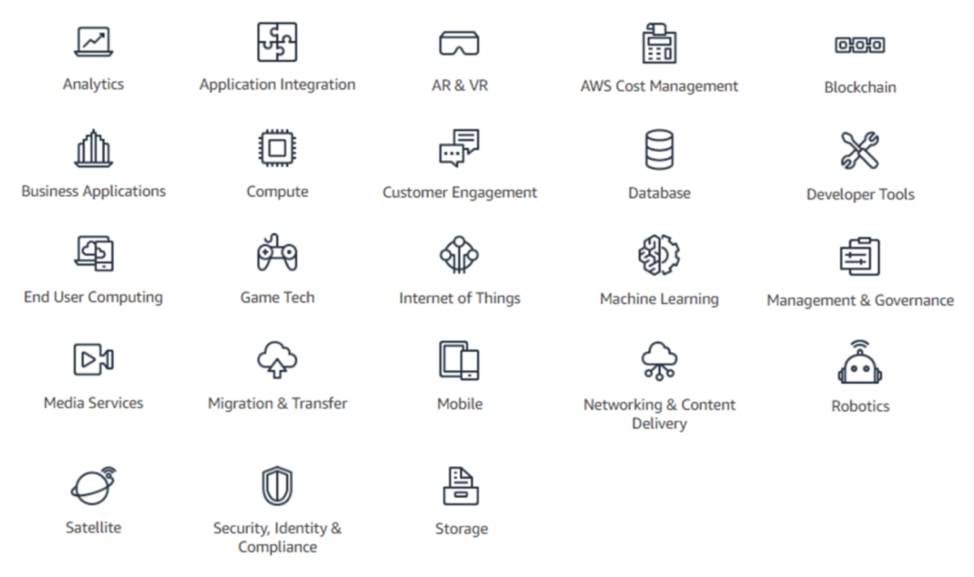
Amazon Web Services offers many services which are broadly categorized into
AWS Compute Services
AWS Compute services provides the processing power needed to run your application. The AWS compute portfolio provides tools to develop, deploy, run, and scale your applications in the AWS Cloud.
AWS Compute Service Examples
Amazon Elastic Compute Cloud (Amazon EC2)
AWS Elastic Beanstalk
AWS Fargate
AWS Lambda
Storage
AWS provides data storage service for hold the information used by your applications. They provide reliable, scalable, and secure options to store, transmit, and back up your data.
AWS Storage Service Examples
Amazon Simple Storage Service (Amazon S3)
Amazon Elastic Block Store (Amazon EBS)
Amazon S3 Glacier
Networking & Content Delivery
AWS provides the broadest and deepest set of networking services with the highest reliability, most security features, and highest performance.
AWS Networking & Content Delivery Service Examples
Amazon Virtual Private Cloud (Amazon VPC)
Amazon Route 53
Amazon CloudFront
Database
AWS database services offers cost efficient, highly secure and scalable database instance in the cloud.
Service Examples
Amazon Aurora
Amazon Relational Database Service (Amazon RDS)
Amazon DynamoDB
Security, Identity & Compliance
These services helps in monitoring as safe environment for your AWS resources by providing limited access to specified users.
Service Examples
AWS Identity and Access Management (IAM)
Amazon Inspector
AWS Shield
AWS Security Hub
AWS Cost Management
Use these services to access information about your costs and usage, organize your costs across business lines, understand cost drivers and usage trends, set budgets, and optimize your AWS usage.
Service Examples
AWS Cost Explorer
AWS Budgets
AWS Cost and Usage Report
Cloud Watch
Analytics
Analytics services enable you to transform raw data into meaningful information. They help you collect, visualize, and analyze your data to get the answers you need to run your business.
Service examples
Amazon Athena
Amazon Redshift
Amazon Kinesis
AWS - Regions & Zones
Regions
Regions in AWS is a physical location around the world where the data centers are clustered.
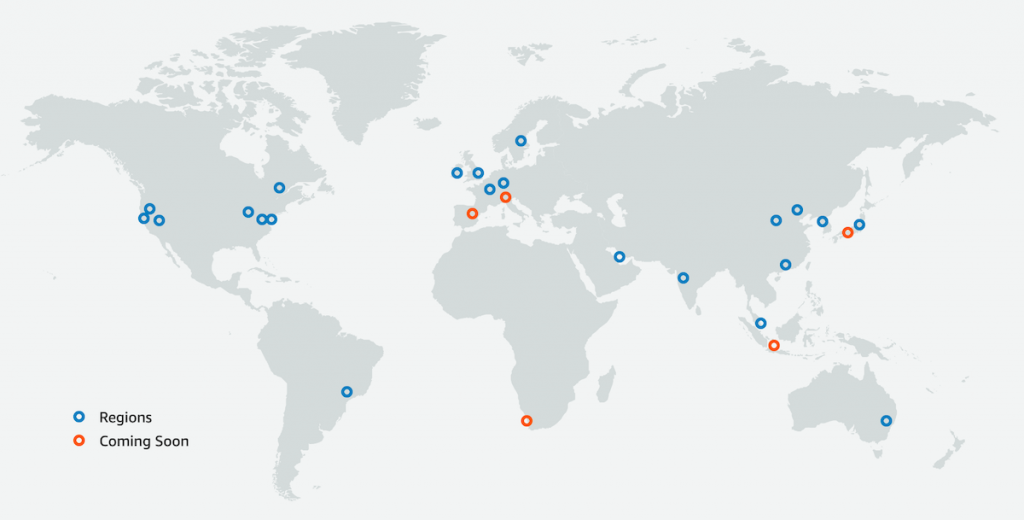
- Each AWS region consists of multiple , isolated, and physical separate Availability Zone. within geographic area.
Imagine that your application is deployed in a data center in London. What would be the challenges?
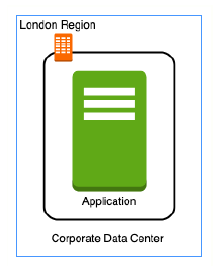
Challenge 1 : Slow access for users from other parts of the world (high latency)
Challenge 2 : What if the data center crashes? Your application goes down (low availability)
Let's add in one more data center in London
Multiple Data centers
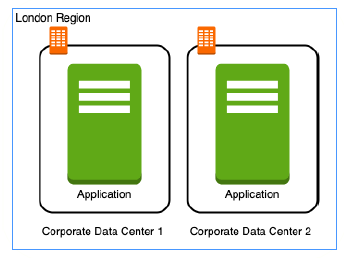
What would be the challenges?
Challenge 1 : Slow access for users from other parts of the world
Challenge 2 (SOLVED) : What if one data center crashes? Your application is still available from the other data center.
Challenge 3 : What if entire region of London is unavailable? Your application goes down
Multiple Regions
Let's add a new region : Mumbai
What would be the challenges?
Challenge 1 (PARTLY SOLVED) : Slow access for users from other parts of the world You can solve this by adding deployments for your applications in other regions.
Challenge 2 (SOLVED) : What if one data center crashes? Your application is still live from the other data centers.
Challenge 3 (SOLVED) : What if entire region of London is unavailable? Your application is served from Mumbai
Regions Advantages
High Availability
Low Latency
Adhere to government regulations
Choosing the right region(s) based on:
Where are your users located?
Where is your data located?
Regulatory and security compliance needs
Availability Zones
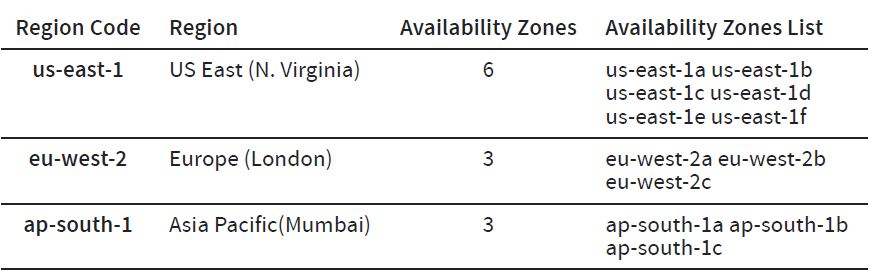
An Availability Zone (AZ) is one or more discrete data centers with redundant power, networking, and connectivity in an AWS Region.
Each AWS Region has at least two Availability Zones
All AZ’s in an AWS Region are interconnected with high-bandwidth, low-latency networking, over fully redundant, dedicated metro fiber providing high-throughput, low-latency networking between AZ’s.
AWS Identity and Access Management
AWS Identity and Access Management (IAM) enables you to manage access to AWS services and resources securely.
or
AWS IAM is all about Authentication(Is it a right user?) and Authorization(Do they have the right access).
Using IAM, you can create and manage AWS users and groups, and use permissions to allow and deny their access to AWS resources.
IAM is a feature of your AWS account offered at no additional charge. You will be charged only for use of other AWS services by your users.
The 4 important concepts in IAM is